Get the Delivery Method Target
Once the Comms Monitor job has determined the delivery method for the comms, it identifies the target for that delivery method, for example, a phone number, email address, postal address or external system. The Comms Monitor job determines targets for delivery methods in the following order:
- EXTERNAL
- PUSH or SMS
 Short Message Service.
A text messaging service component of most mobile telephone systems. SMS uses standardized communication protocols to enable mobile phone devices to exchange short text messages.
Short Message Service.
A text messaging service component of most mobile telephone systems. SMS uses standardized communication protocols to enable mobile phone devices to exchange short text messages. - ONLINE
- LETTER.
Delivery Method = Email
When an EMAIL comms is configured in the Business Configuration A module in the CMP Administation console that provides for viewing and modification of business and user applicable system configuration. console, the target set for the comms can be the email address for:
- The level the comms is raised at
- The oldest subscription A billing entity that incurs a charge. Examples include a network attached device whose usage you want to measure and charge for, or a monthly software subscription for that customer In the context of the Cloud Monetisation Platform, an individual or organisation who has signed an agreement to take goods and services from a service provider. A customer receives a bill associated with one or more subscriptions, and can be a single end user or a large company with many subscriptions assigned to one agreement.
- The parent subscription.
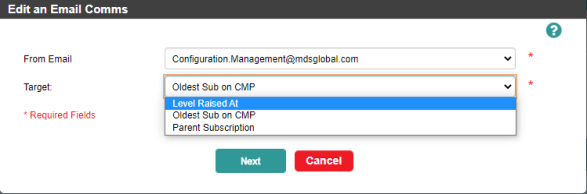
Configuring the target for an EMAIL comms in Business Configuration
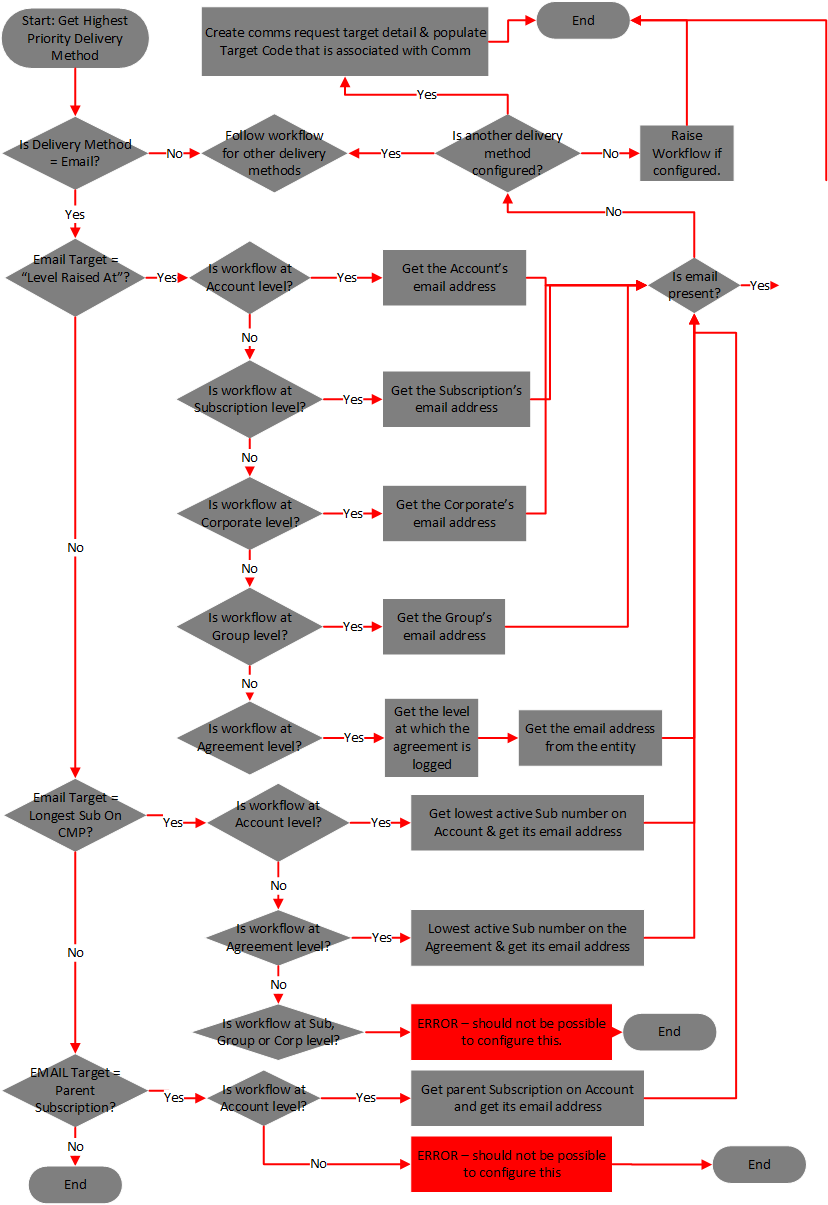
Email Target = Raised at Level
Email Target = Parent Subscription
Set Email Alias and Request Status
Once the Comms Monitor job has identified and set the email target, it populates the following fields on the CommsRequestTargetDistribution table:
- AliasValue field with the From email address from the AliasValue field on the CommsAlias table, which is associated with the record on the CommsCodeCommsDeliveryMethodCode table.
- EMailSubject field.
- DistributionStatus set to A (Awaiting Merge).
Error Handling
If the email address is invalid or not present then the job looks to use an alternative delivery method. If there is no alternative delivery method then CMP cannot send the comms and the job updates the RequestStatus in the CommsRequestHeader table to N (Not Sent).
Click the thumbnail to view the workflow for determining the email target:
Delivery Method = EXTERNAL
If the delivery method is EXTERNAL, the Comms Monitor job creates an entry in the CommsRequestTargetDetail table and populates it with the ExternalTargetCode associated with the comm, which is retrieved from the CommsCodeCommsDeliveryMethod table.
Delivery Method = Push or SMS
The target for a PUSH or SMS delivery method can be:
- Oldest Sub on CMP (account only)
When the entry for the CommsInternalTarget on the CommsCodeCommsDeliveryMethodCode table for the selected comms is O (Oldest Subscription), the Comms Monitor job retrieves the current mobile number of the subscription on the account with the oldest ConnectedDate that is still active. The subscription must also meet these criteria:
- The subscription is postpaid.
- The subscription's network In the context of CMP, the infrastructure on which usage of registered customers will be measured – this could be a mobile phone network, broadband network or other non-telecommunications network. allows SMS (this means the isSMSAllowed flag set to true on its Network Type).
If the subscription is found, the job gets the mobile number and updates the PrimarySerialNumber field on the CommsRequestTargetDetail table. The PrimarySerialNumber is written in E164 format.
- Parent Subscription (account only)
Push comms requests raised at account level can be sent to the parent subscription of the account. A record must exist in the DefaultSubscriptionLink view that specifies the parent subscription for an account. The job queries the table using the account number and linkType = PC.
When the request is processed the job populates the CommsRequestTargetDetail table as follows:
- CustomerLevel column = S (Subscription)
- CustomerReference = Parent subscription number for the account
- PrimarySerialNumber = mobile number of parent subscription, in E164 format
- Subscription
If neither of the above targets apply, then the target is the subscription mobile number. The jobs checks whether the subscription network will accept SMS (IsSMSAllowed = true on the Subs Network Type). If it does, the job retrieves the mobile number of the subscription to which the comms will be sent and updates the PrimarySerialNumber field on the CommsRequestTargetDetail table. The PrimarySerialNumber is written in E164 format.
Error handling
If no subscription is available, the Comms Monitor job looks for an alternative delivery method to send the comms request. The comms will be sent to the alternative if one is available. If no other delivery methods are available, the comms request will go to error and produce a RequestStatus set to N (Not Sent) in the CommsRequestHeader table.
Example - SMS Comms Requests
An SMS comms has target is set to O (Oldest Sub on CMP).
The comm is raised at account level for the following:
Account 1 has two post-paid subscriptions that are on a Network Type that has the isSMSAllowed flag set to True.
Account 2 has one post-paid subscription that is on a Network Type that has the isSMSAllowed flag to True.
Account 3 has two pre-paid subscriptions that are on a Network Type that has isSMSAllowed flag to True.
Account 4 and one post-paid subscription and one-prepaid subscription. Both subscriptions are on a Network Type that has isSMSAllowed flag to True.
Results:
For Accounts 1, 2 and 4:
The Comms Monitor job obtains the mobile number of the oldest subscription of the Account and populates the PrimarySerialNumber field on the CommsRequestTargetDistribution table with the number is E164 format. For Account 4, only the subscription number for the post-paid subscription is entered.
For Account 3:
Due to the subscriptions being pre-paid, the Comms Monitor job will not send SMS or Push notifications to the subscriptions.
The job should look to see if there is an alternative delivery method. It will use the highest priority based on the CommsDeliveryMethod table configuration.
If no alternative delivery method is found an error will be produced.
Delivery Method = ONLINE
The Comms Monitor job checks the entry for the CommsInternalTarget on the CommsCodeCommsDeliveryMethodCode table to determine the target for the ONLINE delivery method:
Target = Oldest Sub on CMPThe job gets the subscription number of oldest active subscription on the account/agreement. If the workflow was raised at subscription level, the job gets the subscription account to work out the longest subscription on CMP. It then creates an entry in the CommsRequestDetailTarget table and sets the app (online) delivery method as appropriate. The DistributionStatus is set to P (Published), as there is no actual sending of a record to do.
Target = Parent Subscription. This concerns comms requests raised at account level where the target is Parent Subscription. To identify the parent subscription on an account, the job queries the DefaultSubscriptionLink table using account number and linkType = PC. When this record is identified, the job gets the subscription number from the DefaultSubscriptionNumber field. If there is a parent subscription, the job creates an entry in the CommsRequestDetailTarget and sets the app delivery method as appropriate. The DistributionStatus is set to P (Published), as there is no actual sending of a record to do. If there is no parent subscription, an error is raised and a workflow, if configured.
Target = Raised at LevelIf the target is not Oldest Sub on CMP or Parent Subscription, then it must be Raised At Level:
Account Level
If the comm is raised at account level, the Comms Monitor job creates an entry in the CommsRequestDetailTarget table and populates Customer Reference fields with the account number. It sets the CommsDeliveryMethodCode to ONLINE. Once the job has gathered the values for the default fields and merged them with the configured text to create a message, the DistributionStatus is set to P (Published), as there is no actual sending of a record to do.
For more information on gathering the values for the default fields and creating the message, see Get the Values for the Default Fields.
Subscription Level
If the comm is raised at subscription level, the Comms Monitor job creates an entry in the CommsRequestDetailTarget table and populates Customer Reference fields with the subscription number. It sets the CommsDeliveryMethodCode to ONLINE. Once the job has gathered the values for the default fields and merged them with the configured text to create a message, the DistributionStatus is set to P (Published), as there is no actual sending of a record to do.
Agreement Level
If the agreement is logged at account level, the Comms Monitor job creates an entry in the CommsRequestDetailTarget table and populates Customer Reference fields with the account number. It sets the CommsDeliveryMethodCode to ONLINE. Once the job has gathered the values for the default fields and merged them with the configured text to create a message, the DistributionStatus is set to P (Published), as there is no actual sending of a record to do. If the agreement is not set at account level this raises an error because ONLINE delivery is not supported for comms raised at group and corporate level. A workflow event is raised, if configured.
Delivery Method = Letter
A LETTER comms can be sent only to the level at which it is was raised. When the LETTER delivery method is used on a workflow event, the comms is sent at the level at which the workflow event is raised.
The Comms Monitor job creates an entry in the CommsRequestDetailTarget table and queries the relevant entities to derive the DeliveryAddressNumber, which it populates. It then updates the DistributionStatus in the CommsRequestTargetDistribution table to A (Awaiting Merge).